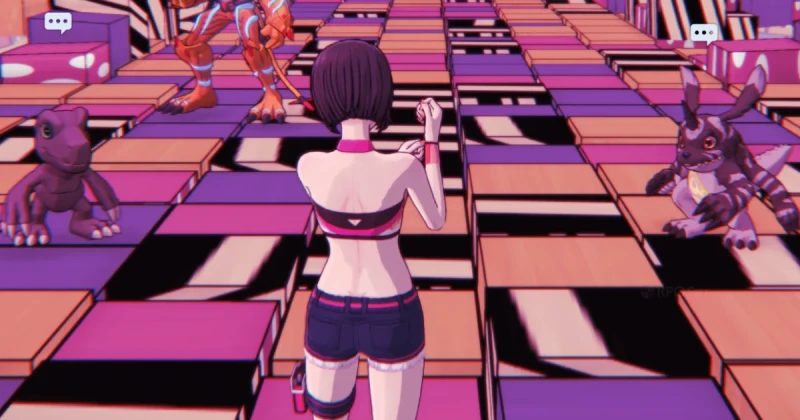
Digimon Story: Time Stranger 2026 Guide — Best Version on Switch, PS5, Xbox & PC: confirmed details
Digimon Story: Time Stranger is being compared across Switch 1, Switch 2, PS5, PS5 Pro, Xbox, Steam, Steam Deck, and handheld PCs in 2026 because buyers want one simple answer: which version plays best? The short answer is that the PS5 and high-end PC versions deliver the cleanest image quality and fastest loading, while Switch 2 is the most interesting portable option if you value convenience over raw performance.
Digimon Story: Time Stranger is a turn-based monster-collecting JRPG developed by Media.Vision and published by Bandai Namco Entertainment. Built for modern hardware, it aims for stable combat presentation, crisp UI readability, and fast travel-friendly load times, but the best experience depends heavily on your platform, display, and whether you prefer docked or handheld play.
If you are deciding where to buy it, the answer is no longer just “pick your favorite console.” The real decision in 2026 is about resolution, frame pacing, load times, and portability. That matters a lot in a game like this, where menus, battle transitions, and stat screens are constantly in use and small performance differences add up quickly.
Direct Answer: Which Version Is Best?
The best overall version of Digimon Story: Time Stranger in 2026 is the PS5 or a strong PC build through Steam. These versions provide the sharpest visuals, the most consistent frame pacing, and the shortest loading times in the core battle loop. If you want the most flexible portable version, Switch 2 is the best handheld compromise, while Switch 1 is the weakest option for players who care about smoothness.
If your priority is portability, Switch 2 and Steam Deck are the most practical choices. Switch 2 generally offers a cleaner image and better stability than Switch 1, while Steam Deck and ASUS ROG Ally can range from “good enough” to “excellent” depending on power profile settings, resolution scaling, and whether you prioritize battery life or responsiveness.
Visuals, Performance, and Load Times Compared
The biggest difference between platforms is how the game handles image clarity and frame consistency. On PS5 and PS5 Pro, Digimon Story: Time Stranger looks the sharpest, especially in character models, battle effects, and UI text. PC on Steam can look even better if you have a modern GPU, but handheld PCs often need compromise settings to maintain stability.
Switch 1 is the version most likely to show soft image scaling, longer loads, and occasional dips during effects-heavy scenes. That does not make it unplayable, but it does make it the least ideal choice if you are sensitive to stutter, input delay, or blurry UI. In a game centered on collecting, evolving, and managing a large party roster, smooth menus matter more than many players expect.
- PS5 / PS5 Pro: Best overall image quality, fast loads, most stable presentation
- Steam on high-end PC: Best potential performance and graphics tuning
- Switch 2: Best Nintendo handheld option, solid compromise for portability
- Xbox Series X|S: Strong performance, especially on Series X
- Steam Deck / ROG Ally: Good portable play with tuning, but not always consistent out of the box
- Switch 1: Most compromises in resolution and smoothness
Load times are another major separator. On SSD-based consoles and PCs, area transitions and battle starts are short enough that the game feels snappy. On weaker handheld hardware, repeated transitions can become noticeable, and in a monster RPG where you bounce between exploration, combat, evolution screens, and menus, those seconds start to add up.
What This Means for Gamers
If you loved Digimon Story: Cyber Sleuth or Digimon Story: Hacker’s Memory, this new entry is built around the same kind of progression satisfaction: build a team, evolve carefully, and optimize around weaknesses. The difference in 2026 is that players expect higher presentation quality than they did years ago, and that makes platform choice more important than ever.
For most people, the best buy is simple: PS5 if you want the most plug-and-play polished experience, Steam if you want the best customizable PC version, and Switch 2 if you want portability without giving up too much quality. Xbox Series X is also a very safe choice, especially if your library already lives there. Switch 1 is only the right call if portability and platform loyalty matter more than visual fidelity.
This is especially relevant if you play other modern turn-based or monster-collecting RPGs like Persona 5 Royal, Dragon Quest Monsters, or Monster Hunter Stories. Those games prove that presentation and pacing matter in a menu-heavy RPG. A stable frame rate improves everything from battle readability to the comfort of long play sessions.
One more thing: on PC, problems that feel like “bad optimization” are often fixed with the same thinking used for a shader stutter fix in other games. Updating drivers, choosing the correct API if available, and avoiding background overlays can dramatically reduce stuttering on Steam, especially on mid-range GPUs and handheld PCs. In other words, the best PC version is often the version you tune properly.
How to Choose the Right Version in 2026
Use this quick decision guide before you buy. It will save you from regret and help you match the version to your actual play style instead of hype.
- Choose PS5 or PS5 Pro if you want the easiest “best looking” option with minimal setup.
- Choose Steam if you want graphics options, ultrawide support potential, controller flexibility, and portable-PC compatibility.
- Choose Switch 2 if you want the best Nintendo handheld version and value convenience.
- Choose Xbox Series X if you want a polished couch experience and already use Xbox as your main platform.
- Choose Steam Deck or ROG Ally if handheld PC play matters more than perfect battery life or locked performance.
- Avoid Switch 1 unless it is your only platform and you are comfortable with the weakest technical version.
If you are shopping for a digital copy, it is worth checking TuniGamers for game keys and instant delivery options. That is especially useful if you want the Steam version or are comparing prices across platforms before launch day or during a seasonal discount.
Troubleshooting Common Issues
Why does the PC version stutter in battles?
If you notice combat hitching on Steam, the issue is often related to shader compilation, driver age, or background software rather than raw GPU power. Updating your graphics drivers, disabling overlays, and letting the game finish its first few minutes of asset loading can often reduce stuttering PC issues significantly.
Why does handheld performance feel worse than expected?
Steam Deck and ROG Ally users may need to lower resolution scaling, cap frame rates, or use a balanced power mode to keep the game smooth. Handheld performance is often limited by thermals and battery presets, so the best result comes from tuning, not just installing and launching.
Why does the Switch 1 version look blurry?
That usually comes from aggressive resolution scaling and reconstruction methods used to keep performance stable on older hardware. The game remains playable, but if image clarity matters to you, the Switch 2, PS5, or Steam versions will look substantially better.
Frequently Asked Questions
What is the best version of Digimon Story: Time Stranger in 2026?
The best overall version is usually PS5 or a well-equipped PC on Steam because they offer the strongest visual clarity, faster loading, and the most stable frame pacing. If you care more about portability, Switch 2 is the best handheld compromise.
Is Digimon Story: Time Stranger better on PS5 or Steam?
PS5 is the easiest “best console” choice, but Steam can outperform it on stronger hardware and gives you more tuning options. If you own a capable GPU and SSD, Steam may be the best version for you.
Does Digimon Story: Time Stranger run well on Steam Deck?
Yes, but it usually benefits from lowered settings, capped frame rates, and sensible power management. Steam Deck is a good option if you accept that handheld convenience comes with some compromise compared to PS5 or a gaming desktop.
Should I buy the Switch 1 version or wait for Switch 2?
If you have both options, wait for Switch 2. The older Switch hardware is the least ideal version in terms of sharpness and stability, while Switch 2 should provide a noticeably better handheld experience.
Where can I buy Digimon Story: Time Stranger digitally?
You can check TuniGamers for digital game keys if you want instant delivery and an easy way to compare platform pricing. That is especially useful for Steam buyers and anyone looking for a fast, secure purchase.
Updated 18 Sep 2026
Related Posts

Marvel's Wolverine Review 2026: Why This Brutal PS5 Game Feels Special
Marvel's Wolverine review 2026 breaks down why Insomniac's PS5 exclusive stands out. Learn combat depth, performance, story tone, and whether it is worth buying now.

Marvel’s Wolverine 2026 Preview: Everything You Need to Know Before Release
Marvel’s Wolverine is shaping up to be Insomniac’s most brutal superhero game yet. Here’s what the 2026 preview reveals about combat, structure, story tone, and whether it lives up to Spider-Man.
Palworld 1.0 Review 2026: Is This Creature Collector Finally Worth It?
Palworld 1.0 blends creature collecting, survival crafting, and base-building into a surprisingly polished package. Here’s the full Palworld 1.0 review with what changed, what still feels off, and who should buy it in 2026.
Assassin’s Creed Black Flag Resynced Review 2026: Is This Remake Worth It?
Assassin’s Creed Black Flag Resynced review coverage explains what’s improved, what still feels dated, and whether this 2026 remake is worth buying for pirate fans.
Paralives Early Access 2026: Is It Worth Playing for Life Sim Fans?
Wondering if Paralives early access is worth it in 2026? Here’s a deep-dive review of features, performance, and who should buy this life sim now.