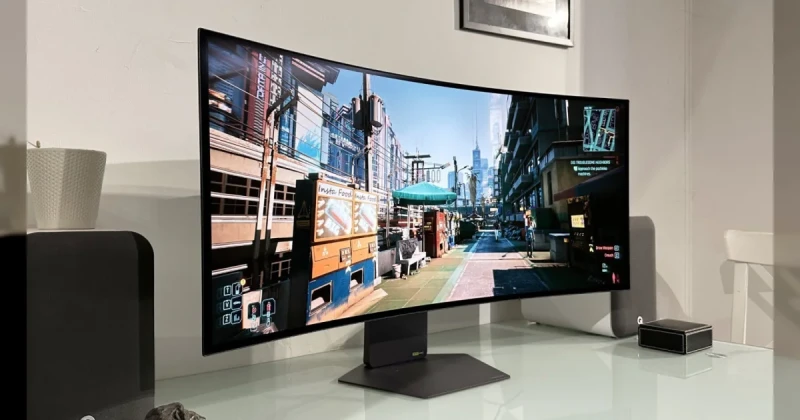
OLED TV Burn-In in 2026: Why Brighter Panels Still Age Faster
OLED TV burn-in remains a real risk in 2026, and the newest tests suggest that higher brightness can still shorten panel life even as image quality improves. That matters for gamers because HUDs, minimaps, and static UI elements can leave persistent marks over time, especially on TVs used for long PC and console sessions.
The key takeaway from the latest round of testing is simple: modern OLEDs are better than older models, but they are not immune to burn-in. If you want the deepest blacks, near-instant response times, and fantastic contrast for games like Cyberpunk 2077 or Resident Evil Village, you still need to understand the trade-off between brightness and long-term durability.
These results also explain why the OLED conversation has become more nuanced. In the same way players compare The Witcher 3 to Skyrim for scope and longevity, display buyers now have to weigh image quality against panel wear, especially if their setup doubles as a work monitor and a gaming screen.
What OLED TV Burn-In Means for Gamers Using PS5, Xbox Series X|S, and PC
OLED burn-in happens when pixels that display the same content for long periods degrade faster than the rest of the panel, causing faint ghost images or uneven wear. On a gaming TV, that can show up after months or years of static health bars, pause menus, score overlays, or desktop taskbars being displayed for many hours a day.
The reason these newer panels can still suffer is that OLED brightness has increased significantly compared with earlier generations. Higher luminance helps with HDR impact and daylight visibility, but it also pushes the organic pixels harder, which can speed up wear if the screen is used aggressively. In practical terms, that means a brighter OLED may look better out of the box but age less gracefully under heavy use.
For gamers, the problem is not only burn-in in the strict sense; it is also image retention, temporary persistence that can look like burn-in during or after a long play session. In many cases retention fades, but repeated stress can contribute to permanent uneven wear over time. That distinction matters when deciding whether an OLED is the best choice for a living-room TV or a desktop display.
- Best for: cinematic single-player games, dark-room gaming, and players who want perfect black levels
- Riskier for: MMO players, competitive HUD-heavy titles, desktop use with static windows, and long TV news or sports viewing
- Higher-risk habits: max brightness, static UI elements, leaving the console on pause, and extended desktop use with unchanged taskbars
- Safer alternatives: Mini-LED and QD-Mini-LED TVs for people who prioritize brightness and lower burn-in risk
How to Reduce OLED Burn-In Risk on Your Gaming Setup
There is no magic setting that makes OLED burn-in impossible, but you can reduce the odds dramatically with the right habits. These are the same practical steps PC gamers use when they want to reduce stuttering PC issues or tune a system for long-term stability: small adjustments done consistently matter more than one big fix.
- Lower peak brightness when you do not need HDR. Many OLEDs are brightest in their most aggressive picture modes, but using them all day is unnecessary for menus, web browsing, or strategy games with static interfaces.
- Enable all panel protection tools. Features such as pixel shifting, logo dimming, screen savers, and compensation cycles are there for a reason. Leave them on unless you have a very specific calibration need.
- Hide static UI elements when possible. In PC games, use the option to reduce HUD opacity or switch to minimalist layouts. In launchers and desktop environments, avoid keeping a static taskbar or browser window in the same spot for hours.
- Mix content types. Rotate between full-screen games, video playback, and varied content instead of leaving one game, one desktop app, or one news channel on repeat.
- Avoid maxing out brightness for every game. HDR400-style habits on an OLED can be excessive. Use the brightness needed for the room, not the brightest setting the panel allows.
If you are shopping for a new display in 2026, the safest purchase decision is not necessarily “OLED or nothing.” Think about your use case first. A living-room TV that mostly runs Final Fantasy VII Rebirth, story games, and movies can be a great OLED fit. A screen that will spend eight hours a day on static spreadsheets, launchers, and MMO hotbars probably is not.
OLED vs Mini-LED for Gaming in 2026: Which One Makes More Sense?
The latest burn-in findings do not make OLED bad; they just remind buyers that display technology always involves compromise. OLED still wins on per-pixel contrast, black levels, pixel response time, and motion clarity, which is why it remains so attractive for competitive FPS players and cinematic AAA fans. But Mini-LED offers a strong alternative for users who want high brightness, excellent HDR punch, and much lower burn-in anxiety.
That trade-off is especially relevant if you play a mix of genres. A player spending most of their time in Call of Duty, FIFA, Helldivers 2, and desktop browsing may be happier with a bright Mini-LED set. Someone replaying atmospheric games like Alan Wake 2 or Dead Space in a dark room will still see why OLED is so highly praised, even with the added maintenance mindset.
In other words, the question is not whether OLED can burn in; it is whether its image quality is worth the maintenance for your specific routine. That is the same logic gamers use when comparing graphics presets in a demanding title: ultra settings look amazing, but not every system or player profile can justify the cost. Here, the cost is longevity.
What Buyers Should Know Before Choosing an OLED TV for PC Gaming
If you want an OLED primarily for gaming, look at how you actually use your screen. A player who turns the TV off after each session, varies content, and keeps the room dark is a much better candidate than someone who leaves a launcher open all day. The panel itself is only part of the story; habits determine real-world wear.
It also helps to remember that not all OLEDs are identical. Newer panels, better thermal management, improved compensation routines, and more intelligent brightness mapping can reduce risk, but they do not eliminate physics. If a manufacturer advertises higher brightness, treat that as a quality boost with a maintenance cost, not free extra performance.
For buyers comparing models, the smarter question is not “Does this OLED burn in?” but “How likely is it to burn in with my usage?” That framing will save you from overbuying features you do not need. If you are still undecided and plan to grab a game key or two for your new setup, TuniGamers can help you build out the library without paying full storefront prices.
Frequently Asked Questions
Do newer OLED TVs still burn in in 2026?
Yes. Newer OLED TVs are more resistant than older models, but they can still suffer permanent wear if bright static content is displayed for long periods. The risk is lower than it used to be, but it is not gone.
Is OLED burn-in worse for gaming than for movies?
Usually yes, because games often include static HUDs, minimaps, health bars, and pause screens that stay in the same location. Movies and TV typically shift on-screen elements more often, which spreads wear more evenly.
How can I prevent burn-in on my OLED gaming TV?
Use built-in protection features, avoid max brightness all the time, vary content, and hide static UI when possible. Turning the TV off properly and allowing compensation cycles to run also helps long-term panel health.
Should I buy OLED or Mini-LED for PC gaming?
Choose OLED if you care most about black levels, contrast, and motion clarity. Choose Mini-LED if you want brighter rooms, lower maintenance, and less concern about static desktop elements or heavy HUD use.
Is OLED worth it for PS5 and Xbox Series X|S?
Yes, especially for cinematic single-player games and dark-room play. Just make sure your habits match the technology, because the best picture quality still comes with some burn-in trade-offs.
Read Also:
Editorially reviewed · Updated 18 Aug 2026
Sources
Related Posts
Call of Duty: Modern Warfare 4 Beta 2026 — First Campaign Mission Revealed
The Call of Duty: Modern Warfare 4 beta is adding a single-player campaign mission for the first time in 2026. Here’s what that means for early access, story testing, and how it could change the beta experience.

Xbox Games Coming August 17–21, 2026: Everything You Need to Know
Xbox’s August 17–21, 2026 lineup brings fresh releases across Series X|S, Xbox One, PC, and Game Pass. Here’s what to expect, what stands out, and which games are worth your time.
Helldivers 2 on PS Plus Extra in 2026: What Today’s Drop Means
Helldivers 2 joins PlayStation Plus Extra and Premium in August 2026, giving subscribers instant access to Arrowhead’s smash-hit co-op shooter. Here’s what the drop means for players, the service, and anyone still deciding whether to buy a key.

Kingdom Hearts 4 in 2026: Playable Mickey Trailer Explained & What It Means
Kingdom Hearts 4 just showed its most exciting gameplay yet, with playable Mickey, Donald, and Goofy revealed at D23 2026. Here’s what the trailer means for the sequel, its story, and fans waiting for the next big Kingdom Hearts news.

Kingdom Hearts IV at D23 2026: New Coco Trailer, Late 2027 Date, Anime
Kingdom Hearts IV got a major D23 2026 update with a new Coco world trailer, a late 2027 release window, and a surprise Kingdom Hearts anime in development.