2026 PC Gaming RAM Guide: How Much Memory an Ultimate Gaming Machine Needs: confirmed details
How much RAM do you need for an ultimate gaming machine in 2026? For most players, 16GB is still the practical minimum, 32GB is the sweet spot for modern AAA gaming, and 64GB only makes sense if you also stream, mod heavily, or multitask while playing. The right answer depends less on the game itself and more on how many background tasks your PC is handling.
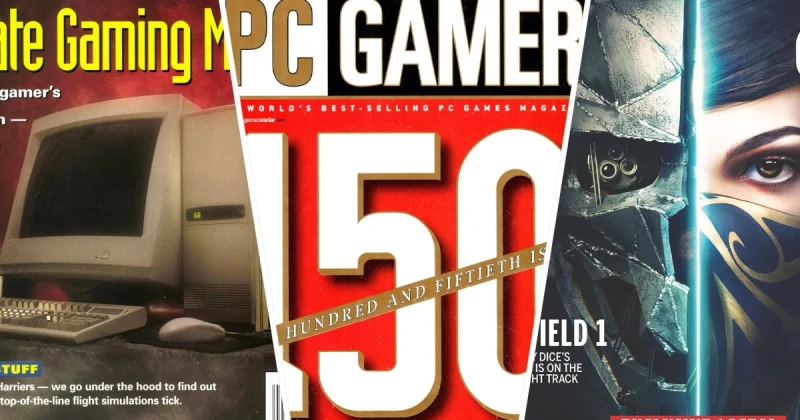
This question matters because PC gaming hardware evolves in waves, not lines. In July 1996, 2006, and 2016, the idea of an “ultimate gaming machine” kept changing as GPUs, engines, and operating systems got more demanding. What was once luxury hardware eventually became the baseline, and RAM has followed that exact pattern.
In other words, the RAM question is not just about specs. It is about whether your machine can keep up with modern open-world games, live-service updates, browser tabs, Discord calls, and recording software without stuttering. That is why the old advice to “just buy more memory” is too vague for 2026.
Direct Answer: How Much RAM Do Gamers Actually Need?
For gaming only, 16GB of RAM is enough for most titles in 2026, but 32GB is the best all-around choice for an ultimate gaming machine. It gives you headroom for Windows 11, game launchers, background apps, and memory-hungry games built on engines like Unreal Engine 5 and the Creation Engine 2. If you play heavily modded games, keep dozens of browser tabs open, or stream while gaming, 64GB can be justified.
The reason 32GB wins is consistency. It reduces hitching in large open worlds, helps with shader-heavy games, and protects against RAM spikes when you alt-tab, capture footage, or run voice chat. You may not always see higher average FPS than on 16GB, but you are far less likely to see the micro-stutters that ruin the feel of a premium PC.
July Through the Years: 1996, 2006, and 2016
PC Gamer’s July retrospectives are useful because they show how fast the “required” spec ceiling rises. In 1996, a machine with a few dozen megabytes of RAM already felt powerful; in 2006, 1GB to 2GB was becoming the realistic target for serious play; by 2016, 8GB was commonly recommended, with 16GB emerging as the enthusiast standard.
That timeline helps explain why RAM anxiety keeps returning every few years. Each generation of games raises the floor, but the market also expands the definition of what a gaming PC must do. Today, a machine running Cyberpunk 2077, Starfield, or Baldur's Gate 3 while also streaming on OBS and keeping Chrome open is doing far more work than a 2016 rig ever had to handle.
Here is the practical evolution:
- 1996: Memory was precious, and 16MB to 32MB could still feel premium.
- 2006: Windows XP-era gaming made 1GB to 2GB the modern comfort zone.
- 2016: 8GB was common, 16GB was ideal for enthusiasts, and future-proofing started to matter.
- 2026: 16GB works, 32GB is recommended, and 64GB is for power users.
The lesson is simple: “ultimate” always means different things depending on the year. In 2026, it means a system that remains smooth when games stream high-resolution textures, compile shaders, and load large worlds on the fly.
Why RAM Matters More in Some Games Than Others
Not every game benefits equally from more memory. A competitive FPS like Counter-Strike 2 or Call of Duty may run perfectly well on 16GB, especially if the rest of the system is balanced. But sprawling RPGs, survival games, and modded sandboxes can push memory use much higher, particularly when texture packs and community mods are involved.
Games built on modern engines tend to be more memory hungry because they stream assets dynamically. Unreal Engine 5 titles often load high-resolution textures and complex environmental data aggressively, while large RPGs from studios like Bethesda Game Studios and publishers like Xbox Game Studios can hit RAM hard during world traversal and fast travel. Comparable experiences like The Witcher 3, Skyrim, and Red Dead Redemption 2 also showed how memory limits can affect smoothness more than raw benchmark numbers suggest.
That is why RAM is often linked to reduce stuttering PC searches, even when the user thinks the problem is the GPU. If your system is constantly swapping data to storage, you may feel hitching that looks like a graphics problem but is really a memory bottleneck. This is especially true in open-world games with dense cities, crowds, and frequent asset streaming.
How to Choose the Right RAM in 2026
If you are building or upgrading an “ultimate gaming machine,” do not look only at capacity. Speed, latency, and memory configuration matter too. A balanced system with 32GB of DDR5 usually beats a mismatched high-capacity setup that runs at poor timings or in single-channel mode.
- Start with capacity: Choose 16GB if you only play a few optimized games; choose 32GB for the best overall gaming experience.
- Pick dual-channel kits: Use 2x8GB, 2x16GB, or 2x32GB instead of a single stick whenever possible.
- Match your motherboard and CPU: Check supported DDR4 or DDR5 speeds before buying.
- Prioritize stability over hype: A slightly slower kit that is stable is better than an unstable kit with flashy ratings.
- Consider your workload: Streaming, video editing, modding, and multitasking all increase RAM needs.
If you are shopping for a new game at the same time you upgrade your machine, TuniGamers can help with instant digital delivery for the titles you plan to benchmark on your new build. A strong PC deserves a strong game library, and buying a digital key is often the fastest way to start testing your setup.
Troubleshooting: Signs You Need More RAM
1. Your game stutters when you enter new areas
If frame rates look fine but the game hitches whenever you move into a new zone, your system may be running low on memory. This is especially common in large open-world games, shader-heavy releases, and modded RPGs. Closing background apps can help, but if the issue returns often, upgrading to 32GB is the real fix.
2. Alt-tabbing feels slow or causes the game to freeze
Slow alt-tab behavior usually means your system is juggling too many apps for the amount of RAM available. Discord, browser tabs, game launchers, and recording software all compete for memory. If you multitask while gaming, this is one of the clearest signs that 16GB is no longer enough for your habits.
3. Your PC uses the page file too often
When Windows starts leaning on your SSD as virtual memory, performance can degrade quickly. That does not always crash the game, but it can create the kind of inconsistent frame pacing people describe as a shader compilation issue or a stutter problem. More RAM often solves the symptom before drivers or settings do.
What This Means for Gamers in 2026
The best takeaway from looking back at July in PC gaming history is that “enough” RAM is a moving target. The old upgrade mantra was to buy the maximum you could afford; today, that advice is less useful than understanding your actual workload. For a pure gaming PC, 16GB still works, but 32GB is the safer long-term choice.
If you want an ultimate gaming machine that stays smooth through next-gen ports, live-service updates, and multitasking, 32GB is the strongest recommendation. Go to 64GB only if you are building a true creator-plus-gamer rig. And if you are pairing that upgrade with new titles, check TuniGamers for digital game keys so you can put your new memory to work immediately.
Frequently Asked Questions
Is 16GB RAM enough for gaming in 2026?
Yes, 16GB is enough for many games in 2026, especially if you only run the game and a few background apps. However, demanding open-world titles, heavy mods, and multitasking can push you beyond comfortable limits, which is why 32GB is now the better long-term choice.
Is 32GB RAM worth it for an ultimate gaming PC?
Absolutely. 32GB is the sweet spot for most enthusiasts because it gives you extra headroom for Windows 11, launchers, voice chat, streaming, and memory-heavy games. It is the easiest way to reduce stuttering PC issues caused by memory pressure.
Do games actually run faster with more RAM?
Sometimes, but not always in the form of higher average FPS. More RAM often improves smoothness, loading behavior, and frame pacing, especially in modern engines like Unreal Engine 5 and in games that stream large amounts of data in real time.
When should I upgrade from 16GB to 32GB?
Upgrade when you notice stutter, slow alt-tabbing, excessive SSD paging, or poor performance while multitasking. If you stream, mod games, or keep many apps open, 32GB is usually worth it even before problems appear.
Where can I buy digital game keys to test a new gaming PC?
TuniGamers is a convenient place to grab digital game keys with instant delivery. That makes it easy to install a few demanding titles, compare performance, and see whether your new RAM upgrade is actually improving gameplay smoothness.
Updated 18 Sep 2026
Related Posts

BlizzCon 2026 Opening Ceremony: Everything Announced and What It Means
BlizzCon 2026 opening ceremony coverage is packed with World of Warcraft, Diablo, and rumored StarCraft news. Here’s everything announced, plus what it means for players.

Halo 2027 Return Revealed: What Fans Need to Know Now
The Halo 2027 return is finally generating real momentum, and fans want answers about the next mainline multiplayer game. Here’s what the announcement means, what remains unconfirmed, and why it matters for Master Chief and Xbox players.

BlizzCon 2026 Opening Ceremony Guide: Biggest Blizzard Announcements
BlizzCon 2026 Opening Ceremony is Blizzard Entertainment’s biggest stage for Diablo, Overwatch, StarCraft, and Warcraft news. Here’s what to expect, why it matters, and how to follow every major announcement.

Diablo 5 in 2029: Everything You Need to Know About Blizzard’s Next Epic
Diablo 5 is officially coming in spring 2029, and Blizzard has also confirmed a Netflix show is in development. Here’s what the announcement means for fans, platforms, and the future of the series.

BlizzCon 2026 Live Blog Guide: Warcraft, Diablo & StarCraft Rumors
BlizzCon 2026 is set to reveal major Warcraft and Diablo news, with StarCraft rumors stealing the spotlight. Here’s the live blog breakdown, what’s confirmed, and what fans should expect.