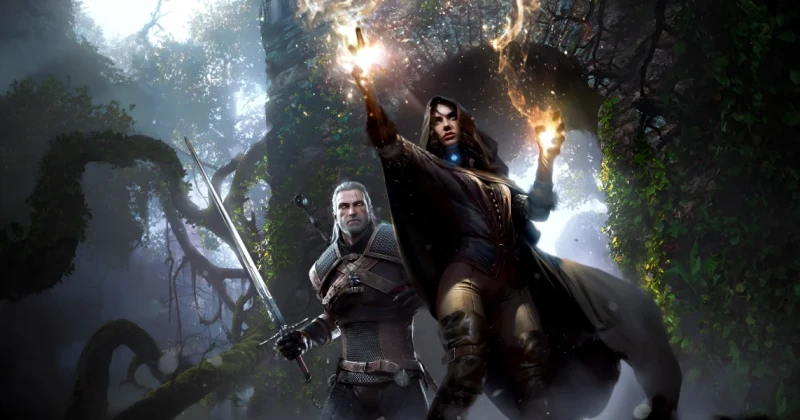
The Witcher 3 Multiplayer Mod in 2026: How to Play Co-op With Friends: confirmed details
The Witcher 3: Wild Hunt multiplayer update is not an official CD Projekt Red feature, but a major fan-made mod breakthrough that lets players explore the Continent with friends in 2026. In practical terms, it turns the single-player action RPG into a synchronized co-op experience, so you can ride, fight, loot, and quest together instead of roaming alone.
The Witcher 3 multiplayer mod matters because it changes the game’s long-standing replay value without touching the core story structure. Built for the Redengine 3 version of the game, it gives one of the best open-world RPGs ever made a new social layer that fans of Skyrim, Dragon Age: Inquisition, and Kingdom Come: Deliverance have wanted for years.
The key idea is simple: you are not getting a brand-new competitive mode, but a cooperative way to experience quests, exploration, and combat with other players. For anyone searching in 2026 for a Witcher 3 co-op guide, this is the closest thing to a true multiplayer expansion the game has ever had.
Direct Answer: How the Multiplayer Update Works
The Witcher 3 multiplayer mod adds online co-op synchronization to the base game so multiple players can move through the world at the same time, usually on the same map instance, while keeping combat, camera behavior, and progression stable enough for practical play. It is a community project, not an official patch, and it requires mod support on PC.
In 2026, the best way to think about it is as a fan-built co-op framework: you and your friends can travel together, fight monsters together, and test the game’s systems in a new way, but you should expect mod limitations, version dependency, and occasional bugs. If you want a polished, stable alternative to solo play, this is impressive; if you want a fully official online RPG, this is not it.
Key Details: Co-op Features, Requirements, and Setup
The biggest appeal of the update is obvious: shared exploration. Instead of taking turns watching each other play, groups can roam Velen, Novigrad, or Skellige together and treat the world like a shared adventure. That makes side quests, monster contracts, scavenger hunts, and roaming combat feel fresh again, especially for veterans who already know the story beats.
Because The Witcher 3 is an open-world action RPG with a deeply scripted narrative, the mod works best when players treat it like a sandbox co-op experiment rather than a strict story sync. The main appeal is emergent fun: synchronized horseback travel, monster fights, and spontaneous chaos when the party splits up or pulls enemies from different directions.
- Game: The Witcher 3: Wild Hunt
- Developer: CD Projekt Red
- Publisher: CD Projekt
- Engine: Redengine 3
- Genre: Open-world action RPG
- Platform: PC via Steam and other PC storefronts
- Mode: Community-made online co-op multiplayer
Installation details can vary by mod release, but most players will need the current PC build of the game, a clean mod setup, and the exact version of the multiplayer mod recommended by its creators. If you are running script-heavy mods already, keep in mind that load order and patch compatibility matter more than ever in 2026.
What you typically need before installing
- A PC copy of The Witcher 3: Wild Hunt
- The same game version as your friends
- Any required script extender or mod loader
- Stable internet connection for synchronization
- Identical mod version across all players
What This Means for Gamers
This update shows why The Witcher 3 still has such a strong community a decade after launch. The game’s combat, exploration, and monster-hunting loop are already excellent, but co-op adds a layer of social energy that official DLC never really aimed for. It is the kind of feature that makes a familiar game feel newly dangerous and unpredictable.
Compared with other major RPGs, this is a different kind of value proposition. Skyrim mod multiplayer projects often focus on sandbox freedom, while Monster Hunter is built around co-op from the start. The Witcher 3 sits in the middle: a tightly authored RPG that becomes more flexible when friends can join the journey. That contrast is what makes the mod so exciting.
Should you install it? If you already own the game and want a fresh reason to return, yes, especially if you and your friends enjoy experimentation. If your priority is a flawless, story-first playthrough, you may be better off staying solo and using the mod only for a second run. Either way, this is a strong reminder that the modding scene often keeps classics alive longer than publishers do.
For players who are new to the series, grabbing the game on TuniGamers can be the fastest way to jump in with a digital key and start planning a co-op run. It is also a smart time to buy if you want to revisit the base game before adding community-made multiplayer on top.
How to Install and Play the Multiplayer Mod
If you want the best chance of a smooth setup, follow a careful installation process rather than stacking mods randomly. This is especially important if you are trying to avoid Witcher 3 co-op bugs, desync issues, or the kind of crashes that can ruin a party session.
- Confirm your game version. Make sure every player is on the same PC build of The Witcher 3: Wild Hunt.
- Back up your save files. Modded co-op sessions are safer when your vanilla saves are untouched.
- Install required mod tools. Use the loader or dependency list specified by the mod author.
- Place files correctly. Follow the exact folder structure, especially for script and DLL-based mods.
- Match mod versions. All players need the same multiplayer build to avoid desync and connection issues.
- Test in a low-risk area. Start in a safe location before attempting long quests or major fights.
The smartest approach is to run a short test session first. Check whether combat sync, movement, and loot behavior work as expected before investing time in a full co-op campaign. That one precaution can save hours of troubleshooting later.
Troubleshooting Common Issues
Game crashes on launch
This is usually caused by version mismatch, missing dependencies, or conflicting scripts. Recheck your game build, confirm that every required mod framework is installed, and temporarily disable unrelated mods until the base multiplayer setup launches correctly.
Friends cannot connect
Connection failures often come from firewall rules, mismatched mod files, or network instability. Make sure the host and all clients are using the same release, then whitelist the game and mod launcher in your security software if needed.
Desync during combat or movement
If enemies or players appear out of sync, reduce the mod loadout and test again. Heavy visual mods, gameplay overhauls, and script conflicts can all worsen synchronization, so a minimal setup is the safest way to diagnose the problem.
Save files stop loading properly
Modded saves can become unstable if you remove core files mid-playthrough. Keep separate save folders for vanilla and multiplayer runs, and always back up before updating the mod or changing your mod list.
What to Expect Before vs After Installing
Before the mod, The Witcher 3 is the classic solo experience: immersive, polished, and focused entirely on Geralt’s journey. After installing the multiplayer update, the game becomes more chaotic, more replayable, and far more social, especially for players who already know where the best gear, monster nests, and hidden contracts are located.
Do not expect the same balance as a purpose-built online game like Diablo IV or Monster Hunter World. This is a community adaptation of a story-driven RPG, so the fun comes from flexibility and novelty, not from perfectly tuned multiplayer design. Even so, in 2026 it is one of the most exciting ways to revisit an all-time great.
Frequently Asked Questions
Is The Witcher 3 multiplayer official in 2026?
No, the multiplayer update is a fan-made mod, not an official CD Projekt Red feature. It is designed by the community to add co-op functionality to the PC version of The Witcher 3: Wild Hunt.
Can you play The Witcher 3 co-op on PC?
Yes, the mod is intended for PC players, and it works best when everyone uses the same game version and mod files. Console versions do not support this community-made multiplayer setup in the same way.
Does the multiplayer mod support the full story?
It is best used for exploration, combat, and shared gameplay sessions, but story synchronization can be limited depending on the mod’s current build. Treat it as a co-op adventure layer rather than a perfect replacement for the original campaign.
What is the best way to avoid Witcher 3 co-op bugs?
Use a clean mod list, keep all players on the same version, and test the setup in a short session before starting a longer run. Backing up saves and avoiding conflicting overhaul mods also helps reduce crashes and desync.
Is The Witcher 3 still worth buying in 2026?
Absolutely, especially if you want one of the best open-world RPGs ever made with massive replay value. If you plan to try the multiplayer mod, buying a PC key and setting up a stable install on day one makes the experience much smoother.
If you want to jump back into Geralt’s world, check TuniGamers for a digital key and get ready to experience one of the most ambitious fan-made co-op projects ever built around a single-player RPG.
Updated 18 Sep 2026
Related Posts

BlizzCon 2026 Opening Ceremony: Everything Announced and What It Means
BlizzCon 2026 opening ceremony coverage is packed with World of Warcraft, Diablo, and rumored StarCraft news. Here’s everything announced, plus what it means for players.

Halo’s 2027 cover reveal was for the novel Fireteam Noble
Halo: Fireteam Noble is a Troy Denning novel announced for early 2027. Its cover reveal did not announce the next multiplayer Halo game.

BlizzCon 2026 Opening Ceremony Guide: Biggest Blizzard Announcements
BlizzCon 2026 Opening Ceremony is Blizzard Entertainment’s biggest stage for Diablo, Overwatch, StarCraft, and Warcraft news. Here’s what to expect, why it matters, and how to follow every major announcement.

Diablo 5 in 2029: Everything You Need to Know About Blizzard’s Next Epic
Diablo 5 is officially coming in spring 2029, and Blizzard has also confirmed a Netflix show is in development. Here’s what the announcement means for fans, platforms, and the future of the series.

BlizzCon 2026 Live Blog Guide: Warcraft, Diablo & StarCraft Rumors
BlizzCon 2026 is set to reveal major Warcraft and Diablo news, with StarCraft rumors stealing the spotlight. Here’s the live blog breakdown, what’s confirmed, and what fans should expect.