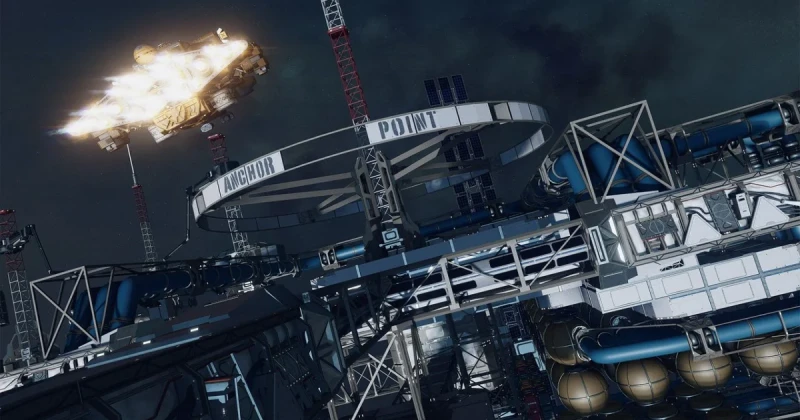
What Is the Algorab System and Why Players Are Going There
The Algorab system in Starfield is a remote star system far from the game’s core traffic lanes, and Anchorpoint Station is one of the key locations hidden there. In practical terms, this means you need a ship with enough jump range, good fuel planning, and access to the broader star map before you can reach it reliably.
Anchorpoint Station is a deep-space destination in Starfield’s Algorab system, a remote area that sits well beyond the starting regions most players explore early on. To find it, you must travel through the starmap, extend your grav drive route, and often complete enough exploration to reveal the system efficiently. The station is not difficult to visit once you know where to look, but the game does not make the path obvious.
Starfield, developed by Bethesda Game Studios and published by Bethesda Softworks, uses the Creation Engine 2 to support its open-world action RPG structure across spaceflight, planetary exploration, and questing. That scale is exactly why remote locations like Algorab can feel confusing: the game expects you to learn navigation as part of the experience, similar to how players hunt distant story hubs in No Man’s Sky, Mass Effect, or even the more guided late-game travel in Elite Dangerous.
How to Reach the Algorab System Step by Step
If you’re asking how to get to the Starfield Algorab system, the answer is simple: you need to open the star map, move your cursor across the settled systems, and plot a jump chain that reaches the remote outer galaxy region where Algorab sits. The route is usually blocked early by limited jump range rather than by a quest lock.
- Open the Starmap from your ship cockpit or menu and switch to galaxy navigation.
- Zoom out fully so you can see multiple star systems instead of only your current local cluster.
- Check your grav drive range and make sure your ship can chain jumps without running out of route options.
- Plot the route manually if auto-routing does not highlight Algorab immediately.
- Upgrade your ship if needed: a better grav drive and reactor can make long-distance travel much easier.
The biggest mistake players make is assuming Algorab should be reachable from the first few hours of play. In many builds, you’ll need to progress naturally through exploration, unlock more systems on the map, or revisit the route after improving your ship. If you are stuck, look at your maximum jump distance and compare it with the systems between your current position and the destination.
When searching for Anchorpoint Station, remember that the station is located inside Algorab rather than being a separate system. Once you arrive in Algorab, scan the system map carefully and select the station marker. Some players miss it because they are looking for a planet instead of a space installation.
What You Need Before You Go
Traveling to a far system like Algorab is much easier if you prepare your ship and inventory first. Starfield’s space RPG mechanics reward planning, and long jumps can become frustrating if you are carrying too much or flying an underpowered starter ship.
- Enough fuel and jump range to chain travel without dead ends
- A reliable grav drive with solid distance stats
- Ship mobility and shields in case hostile contacts appear en route
- Repair supplies and med items for unexpected encounters
- Free cargo space so your ship does not feel sluggish or overloaded
If you are still early in the campaign, it may be smarter to treat Algorab as a mid-game objective. That is especially true if your ship feels weak compared with the more customized builds players create in games like Star Wars Outlaws, Mass Effect Legendary Edition, or Helldivers 2, where traversal and loadout choices dramatically change how comfortable travel feels.
Why This Location Matters for Starfield Players
Anchorpoint Station matters because remote locations often hide quest progress, rare loot, or narrative breadcrumbs that connect broader systems together. In Starfield, Bethesda likes to place meaningful content behind exploration rather than forcing everything onto your map at once. That design makes discovery satisfying, but it also means you need to be deliberate.
For completionists, the trip to Algorab is worth it because it tests one of Starfield’s core strengths: self-directed navigation. For casual players, it can feel like a hidden bottleneck if the quest log gives only a vague destination. Either way, the location is a good example of why Starfield plays more like a long-form space expedition than a traditional linear shooter.
The best comparison is not just Skyrim or Fallout 4, but also other large-scale exploration games where map literacy matters. In The Outer Worlds, destinations are more curated. In Starfield, the galaxy map asks you to act like a navigator, and that is what makes finding places such as Anchorpoint Station feel earned.
Common Problems When Searching for Anchorpoint Station
The station does not appear on my map
If Anchorpoint Station is missing, zoom out further and make sure you are viewing the system map, not just the local planet view. In some cases, the station marker is easy to miss because the interface is crowded. Re-centering the map and reselecting Algorab usually fixes the issue.
I cannot reach Algorab with my current ship
This usually means your grav drive range is too short. Upgrade the drive, reduce cargo weight if your setup is inefficient, or take a route through intermediate systems if the direct path is unavailable. This is one of the most common fix Starfield route problems for newer players.
I keep losing track of the destination after fast travel
Starfield’s navigation can be disorienting when you jump across multiple systems quickly. Mark Algorab as your active route target and avoid switching menus too often. If needed, land on a nearby system and rebuild the route from there instead of trying to force a long jump from memory.
My ship feels too weak for long-distance travel
That is a sign you should upgrade shields, reactor power, and mobility before pushing deeper into the galaxy. A stronger ship makes reduce stuttering PC-style troubleshooting irrelevant here, but the same principle applies: remove friction before it becomes a problem. In Starfield, travel comfort is part of progression.
Frequently Asked Questions
Where is Anchorpoint Station in Starfield?
Anchorpoint Station is located in the Algorab system, which is far from the early-game areas most players visit first. You need to access the galaxy map, plot a route, and travel through enough systems to reach it.
How do I get to the Algorab system?
Open the starmap, zoom out, and manually plot a route to Algorab. If the route does not appear, your ship may not have enough jump range, or you may need to travel through intermediate systems first.
Do I need a special quest to visit Anchorpoint Station?
Not always. Some players reach it through a quest objective, while others find it through exploration or system discovery. The key requirement is usually navigation access rather than a hard story lock.
What ship upgrades help the most for long travel?
A stronger grav drive is the most important upgrade, followed by reactor output and shields. Better cargo management also helps because overloaded ships can make travel feel slower and less efficient.
Is it worth going to Anchorpoint Station in 2026?
Yes, especially if you enjoy exploration, completionist play, or hidden Starfield content. The location is a good test of your navigation skills and a reminder that Bethesda’s open-world RPG design still rewards curiosity.
If you’re planning to keep playing Starfield long term, grab a digital copy or expansion-ready key from TuniGamers to keep your library organized and ready for future updates. It is also a smart place to check if you want the best price on digital game keys without wasting time searching multiple stores.
Updated 18 Sep 2026
Related Posts

The Blood of Dawnwalker Armor Proficiency Guide 2026: How to Fix Heavy Armor Penalties
The Blood of Dawnwalker armor proficiency determines when Medium Armor and Heavy Armor stop draining stamina and slowing you down. Here’s how the Swordmastery skill tree works, what to unlock first, and how to avoid costly mistakes.

A game leaves Game Pass: what happens to DLC and saves?
Separate catalogue departure from subscription expiry before deciding what to buy or keep.

Reinstall Windows 11: protect files, activation and BitLocker keys
Prepare recovery without confusing repair, wiping a drive and buying another Windows licence.

Steam Cloud conflicts and Xbox saves: protect your progress
Identify the correct save and verify synchronisation before playing on another device.

Fortnite: identify your Epic account before linking a console
Find the account holding your progress and items before changing a console connection.