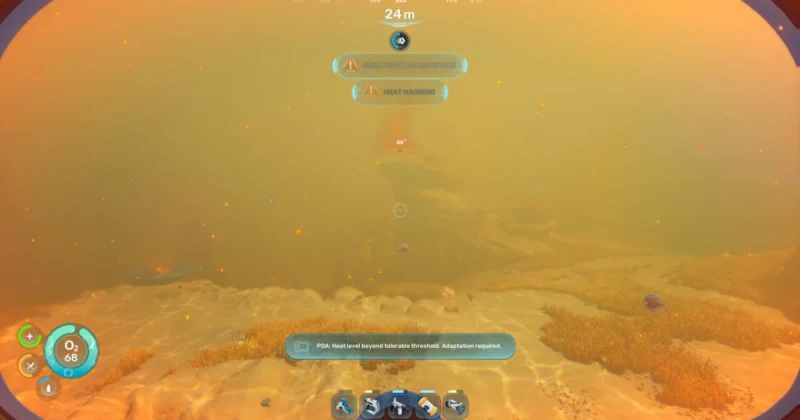
What Is the Heat Barrier in Subnautica 2?
Subnautica 2 uses a heat barrier to block players from entering an early-access biome that becomes dangerously hot as you move away from the starting lifepod. The warning appears around 250 meters out, and without the right gear your character takes heat damage and must turn back.
This matters because the biome is not just cosmetic: it is a gate that protects progression, limits accidental death, and signals that the game expects you to prepare before pushing deeper. Developed by Unknown Worlds Entertainment and published by Krafton, Subnautica 2 continues the survival crafting formula of the first game, using an underwater open-world structure similar in pacing to Subnautica, Subnautica: Below Zero, and even the exploration-first tension found in Raft and ARK: Survival Evolved.
To get past the heat barrier in Subnautica 2, you need heat protection gear before entering the biome. Once your PDA shows temperatures climbing into the 30–80°C range, you should stop advancing, craft the required protection item, and return only when your survivability is high enough to avoid damage.
The barrier is not a bug or a hidden wall; it is a temperature-based survival check built into early access. If you see the red temperature indicator and the warning message, the game is telling you that your current equipment is insufficient for safe exploration of that zone.
How to Survive the Heat Barrier: Step by Step
If you want to explore this biome without getting burned, your first job is to treat the area like an environmental hazard rather than a normal cave or wreck route. The early-access build keeps the map space limited, so every upgrade matters more than it does in a full release survival game.
- Watch the temperature HUD and turn back before it climbs too high. The water near the lifepod sits around 20°C, but the hot zone ramps up quickly once you cross the warning threshold.
- Scan nearby resources before attempting the trip again. In survival games like Subnautica 2, preparation beats improvisation every time.
- Craft the required heat-protection equipment as soon as it becomes available in your progression tree. If you have not unlocked it yet, you are not meant to brute-force the zone.
- Bring backup supplies such as food, water, repair materials, and spare oxygen support. The heat barrier is one danger; getting stranded inside it is the second.
- Test the edge of the biome first, then advance in short bursts. This reduces risk and helps you confirm whether your protection is enough.
In most survival-crafting games, the smartest path is not rushing straight into the loudest or brightest area. It is returning to your base loop, upgrading your tools, and then revisiting the hazard with a plan. That same logic applies here, whether you are mapping new zones in Subnautica 2 or min-maxing progression in games like Green Hell and No Man’s Sky.
What gear should you prioritize?
While Subnautica 2 may adjust recipes and balance during early access, the safe approach is to focus on mobility, survival, and environmental resistance. Any item that lets you stay alive longer, move farther, or withstand harsher conditions is valuable before you enter the heat zone.
- Heat-resistant progression items once unlocked by scanning, crafting, or story advancement
- Navigation support so you can mark the barrier edge and retreat quickly
- Resource-gathering tools for collecting upgrade materials efficiently
- Emergency supplies for oxygen, healing, and hydration
What This Means for Early-Access Players
The heat barrier is a classic early-access design choice: it gives players a glimpse of future content without letting them rush through unfinished balancing. That can feel frustrating if you are used to games that let you brute-force every obstacle, but it is actually a useful sign that the world is being built with progression in mind.
Compared with the original Subnautica, the early map restrictions in Subnautica 2 make route planning more important. Instead of wandering aimlessly, players should think like cartographers: identify safe corridors, memorize resource clusters, and return only after they have the right tool for the job. If you enjoy survival games where knowledge is power, this is a good sign. If you prefer instant exploration, you may want to wait for more content before diving too deep.
The biggest lesson is that the heat barrier is not just a temperature wall; it is a pacing mechanism. It teaches you to respect environmental storytelling, prepare before exploring, and avoid wasting resources on a doomed attempt. That is the same kind of long-game thinking that makes the best survival titles memorable, from Subnautica: Below Zero to The Forest.
Troubleshooting: Why You Still Cannot Enter the Hot Biome
You are seeing the heat warning too early
If the warning appears before you think you are near the biome, double-check your heading and depth. In open-water survival games, environmental cues can be misleading, and you may be skimming the outer edge of the hazard without realizing it.
You crafted the wrong upgrade or still lack the unlock
Early access often means recipes and progression gates are still being tuned. If your gear does not seem to help, make sure you have the correct heat-protection item rather than a general-purpose mobility upgrade. Not every suit or module protects against temperature damage.
You entered the zone, but the damage keeps rising
This usually means your resistance is not high enough for the biome’s inner layers. Back out immediately, save resources, and return later with stronger equipment. Treat the warning like a shader stutter fix in a PC game: if the base problem is not resolved, forcing it only makes performance worse.
The route is blocked by terrain or limited map space
Because Subnautica 2 is still in early access, some areas may look reachable but are intentionally constrained. Revisit the zone after additional updates, and use your scanner, markers, and depth awareness to separate unfinished boundaries from intended progression locks.
How to Prepare Before You Go Back
Before your next attempt, make sure your inventory is not full of low-priority items. Clear space for crafting materials, defensive tools, and emergency consumables. If you have a base nearby, stock it with extra batteries, first-aid items, and the materials needed for another run.
It is also worth keeping a mental checklist: temperature resistance, oxygen management, map awareness, and an exit route. In a game built around pressure and discovery, losing thirty minutes of progress because you ignored a red warning is avoidable. If you want a fresh playthrough or want to catch up with the series before more early-access changes arrive, you can grab digital keys for the Subnautica series on TuniGamers for instant delivery.
For players who like survival games with deep exploration loops, the barrier is a reminder of why the series stands out. It turns every new biome into a test of preparation, not just curiosity. That structure is what makes the franchise feel closer to a true survival expedition than a simple ocean sandbox.
Frequently Asked Questions
How do you get past the heat barrier in Subnautica 2?
You need the proper heat-protection gear before entering the biome. Once the temperature warning climbs into the red range, you should stop advancing, craft the required upgrade, and return only after your character can survive the environmental damage.
What temperature does the hot biome reach?
The waters near the starting area are around 20°C, but the dangerous zone can rise from roughly 30°C to 80°C as you move closer. The exact value depends on where you are in the biome and how deep you travel.
Is the heat barrier a bug or an intentional lock?
It is intentional. The warning is part of Subnautica 2’s progression design in early access, helping keep players from entering areas before they have the right tools and resistance to survive them.
What should I bring before exploring the heat zone?
Bring survival essentials such as food, water, batteries, repair materials, and navigation support, plus the correct heat-resistance upgrade. If you do not have enough supplies for a retreat, you are not ready to push deeper.
Will the heat barrier change in future updates?
Very likely. Early access games frequently rebalance environmental hazards, recipes, and progression gates as developers gather feedback. Keep an eye on patch notes from Unknown Worlds Entertainment for changes to temperature systems and biome access.
Read Also:
- 12 Best Minecraft Seeds in 2026: Guide to Amazing Worlds
- Assassin's Creed Hexe 2026: Fall Release, Dark Details & Hype
- Best New Games This Week: May 2026 Releases & Deals
Updated 18 Sep 2026
Related Posts

The Blood of Dawnwalker Armor Proficiency Guide 2026: How to Fix Heavy Armor Penalties
The Blood of Dawnwalker armor proficiency determines when Medium Armor and Heavy Armor stop draining stamina and slowing you down. Here’s how the Swordmastery skill tree works, what to unlock first, and how to avoid costly mistakes.

A game leaves Game Pass: what happens to DLC and saves?
Separate catalogue departure from subscription expiry before deciding what to buy or keep.

Reinstall Windows 11: protect files, activation and BitLocker keys
Prepare recovery without confusing repair, wiping a drive and buying another Windows licence.

Steam Cloud conflicts and Xbox saves: protect your progress
Identify the correct save and verify synchronisation before playing on another device.

Fortnite: identify your Epic account before linking a console
Find the account holding your progress and items before changing a console connection.