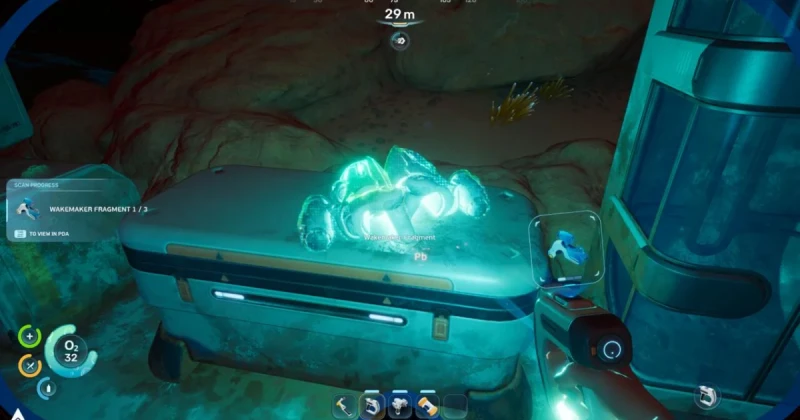
What Is the Wakemaker in Subnautica 2?
Subnautica 2 gives you very limited mobility at the start, and the Wakemaker is the early-game tool that changes that pace. It works like the original game's Sea Glide: once crafted, it dramatically increases swim speed and makes exploration on Proteus far less punishing.
To craft the Wakemaker, you must scan three separate Wakemaker fragments before the blueprint unlocks. Those fragments are found around wrecks, outposts, and colonies scattered across the ocean floor, so this is less about raw combat and more about smart exploration. If you want to reduce early-game travel time, this is the first major mobility upgrade to prioritize.
Developed by Unknown Worlds Entertainment and published by Krafton, Subnautica 2 continues the series' survival-crafting formula with a strong focus on underwater discovery, resource management, and route planning. Like Subnautica and Below Zero, it rewards players who learn the map early and grab movement tools as soon as possible.
How to Find Wakemaker Fragments Fast
The Wakemaker fragments are tied to world exploration, not a simple crafting menu unlock. In practice, that means the fastest path is to search locations with man-made structures first, especially the kinds of areas that already attract useful salvage in survival games like Subnautica, Below Zero, and even Grounded's resource-heavy biomes.
You need three fragments total, and the best strategy is to sweep shipwrecks, outposts, and abandoned colonies while keeping an eye out for scan prompts. Because underwater visibility and depth can make navigation tricky, it helps to move in a spiral pattern around each structure instead of rushing straight through the center.
- Shipwrecks: usually the most reliable first stop, especially around large debris fields.
- Outposts: check interiors, side rooms, and external platforms.
- Colonies: search around equipment clusters and broken living quarters.
- Ocean-floor ruins: scan any object that looks like advanced tech or mobility gear.
One of the biggest early-game mistakes is leaving after finding only one or two pieces. If you are already in a dangerous area, stay until you complete all three scans. That avoids repeated trips, which is especially important when your oxygen supply, battery life, and return route are all limited.
Best early-game approach for fragment hunting
Start with the closest wrecks and outposts near your safe zone, then expand outward in layers. Use your Air Bladder and Dash ability for short bursts, but do not rely on them as replacements for the Wakemaker. Those options help you survive the early grind; the Wakemaker is what actually makes the early game feel smooth.
If you are playing cautiously, bring extra oxygen support, enough food and water, and a mental note of your escape path before diving into larger structures. The best fragment runs are efficient, not reckless.
How to Unlock and Craft the Wakemaker
Once you have scanned all three Wakemaker fragments, the recipe unlocks automatically. From there, you only need the listed crafting materials at your fabricator or equivalent crafting station. The exact material list can vary as the game evolves in early access, so always confirm the blueprint screen before heading on a farming run.
This is where a lot of players lose time: they find the fragments, unlock the blueprint, and then forget to stockpile the needed components. The smartest method is to carry a small set of generic survival materials as you explore so you can craft the Wakemaker immediately once the recipe appears. That way, you avoid another slow swim back to base.
- Find a wreck, outpost, or colony with fragment spawns.
- Scan the first fragment, then continue searching the surrounding rooms and exterior walls.
- Repeat until you have 3/3 fragments.
- Open the blueprint menu and verify the Wakemaker recipe is unlocked.
- Gather the required materials and craft it as soon as possible.
If you are the type of player who likes efficient progression, this is the same mindset you would use in Raft or Valheim: upgrade mobility first, and everything else becomes easier. Better traversal means easier resource gathering, safer scouting, and faster returns to high-value areas.
Why the Wakemaker Matters So Much Early On
The early hours of Subnautica 2 can feel slow by design, and that pacing is part of the survival tension. But when movement is too limited, exploration stops feeling mysterious and starts feeling tedious. The Wakemaker fixes that balance by making map learning faster without removing danger entirely.
From a design perspective, it is the equivalent of a quality-of-life milestone. You are not just swimming faster; you are improving scouting efficiency, oxygen management, and your ability to escape hostile creatures or dead-end routes. In a game built around underwater verticality, speed is information.
Compared with other survival crafting games, this is the kind of upgrade that changes your entire route planning. In Subnautica, the Sea Glide was often the item that transformed a frustrating start into a rewarding loop. The Wakemaker fills that same role in Subnautica 2, and if you ignore it, you will feel the drag immediately.
It is also worth noting that mobility upgrades tend to compound. The faster you move, the more fragments you can scan, the more materials you can collect, and the sooner you can build the rest of your survival toolkit. If you are trying to optimize your run, the Wakemaker should be near the top of your priority list.
Troubleshooting Wakemaker Fragment Hunting
Can't find any Wakemaker fragments?
If you are searching random open water and coming up empty, focus on human-made structures instead. The most reliable spawns are around shipwrecks, outposts, and colonies, not in wide open biomes. Search the perimeter of those locations and check for scan markers on small objects tucked near walls or debris.
Scanned fragments but the blueprint still won't unlock?
Double-check that you have scanned all three unique fragments, not just interacted with them. Some players misread partial progress when they have only 2/3 pieces. If the count is correct and the recipe still is not visible, leave the area, reload your save, and recheck the blueprint menu.
Getting lost while fragment hunting?
Use a simple outward-and-back route instead of free roaming. Mark landmarks mentally: a wreck entrance, a colony tower, or a distinctive ruin corridor. That approach reduces the risk of running out of oxygen far from safety, and it is one of the easiest ways to improve your early-game exploration in any underwater survival game.
Frequently Asked Questions
How many Wakemaker fragments do you need in Subnautica 2?
You need three Wakemaker fragments to unlock the crafting blueprint. Once all three are scanned, the recipe becomes available automatically, assuming you have reached the proper progression stage in the game.
Where are Wakemaker fragments found most often?
The most reliable places to look are shipwrecks, outposts, and colonies on the ocean floor of Proteus. Search the edges, side rooms, and debris clusters carefully, because fragments are often placed near other salvage or broken tech.
Is the Wakemaker worth getting early?
Yes, absolutely. The Wakemaker is one of the most valuable early-game upgrades because it saves time, reduces travel frustration, and makes fragment hunting much easier. If you are playing Subnautica 2 efficiently, it should be one of your first major goals.
Does the Wakemaker replace the Air Bladder or Dash ability?
No, it complements them. The Air Bladder and Dash ability still help in emergencies or short bursts, but the Wakemaker is the tool that makes everyday movement faster and more comfortable across the whole early game.
Can you buy Subnautica 2 digitally on TuniGamers?
Yes, if you are looking to jump into the game quickly, you can check TuniGamers for digital game keys and fast delivery. It is a convenient option for players who want to secure their copy and start exploring right away.
If you are building your Subnautica 2 wishlist around survival essentials, the Wakemaker is only the start. Grab your copy on TuniGamers if you want instant access, then focus on scanning fragments, unlocking mobility, and making the hostile ocean feel a lot more manageable.
Updated 18 Sep 2026
Related Posts

The Blood of Dawnwalker Armor Proficiency Guide 2026: How to Fix Heavy Armor Penalties
The Blood of Dawnwalker armor proficiency determines when Medium Armor and Heavy Armor stop draining stamina and slowing you down. Here’s how the Swordmastery skill tree works, what to unlock first, and how to avoid costly mistakes.

A game leaves Game Pass: what happens to DLC and saves?
Separate catalogue departure from subscription expiry before deciding what to buy or keep.

Reinstall Windows 11: protect files, activation and BitLocker keys
Prepare recovery without confusing repair, wiping a drive and buying another Windows licence.

Steam Cloud conflicts and Xbox saves: protect your progress
Identify the correct save and verify synchronisation before playing on another device.

Fortnite: identify your Epic account before linking a console
Find the account holding your progress and items before changing a console connection.